
Therapy Companion · Workflow guide
Connect appointments, notes, billing, and client homework
Therapy Companion brings appointments, clinical notes, billing, and client homework into the same practice platform. Homework is assigned to a client with instructions and an optional due date. The client can update their practice work, while clinical review and billing remain separate responsibilities.
Before you start
Therapists evaluating an EHR and between-session client work together, including practices considering replacing multiple tools.
- The correct client relationship and account access for the intended task.
- A clear agreement with the client about the activity, its purpose, and what they choose to share.
- Your practice’s scheduling and billing setup; insurance connections apply only where insurance is used.
The workflow, step by step
Start with the client and appointment
Confirm the client and appointment context. Scheduling, preparation, and clinical documentation belong to the same practice platform, but each action still needs the correct record and permissions.
Check the resultThe appointment and the clinical record refer to the same client and service.
Document and review the session
Write the session note or prepare a draft from your written input. Review and save the note, and complete the signature workflow separately. Adding homework does not sign a note or establish that a service is billable.
Check the resultThe note’s content and status accurately reflect the completed documentation work.
Assign a specific activity
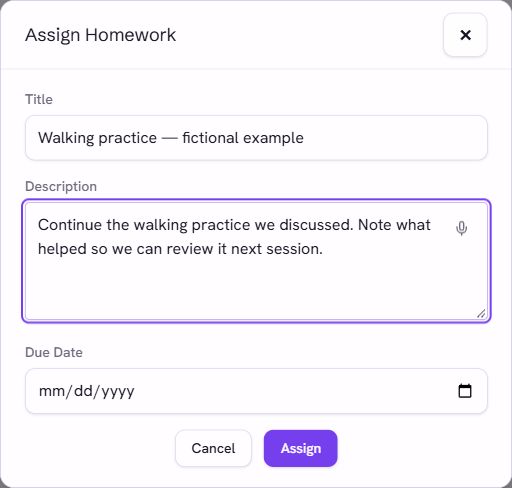
Use Assign Homework to enter a title, instructions, and an optional due date for the selected client. The title should make the activity recognizable; the instructions should describe what you and the client agreed.
Check the resultThe saved activity is attached to the intended client and has the intended wording and date.
Let the client update their practice work
The client’s Practices view presents their assigned work and supports updates and completion. Completed and skipped items remain distinct. A completion status reports an activity update; it is not evidence of a clinical outcome.
Check the resultThe therapist and client views show the appropriate activity and its current status.
Review shared material and billing separately
Before the next session, review the between-session material available to you. Clients control sharing of private reflections. Separately check invoices, claims, and payment status through the billing workflow; do not assume a completed activity or signed note means a claim has been paid.
Check the resultPreparation uses material the client has shared, and financial follow-up is checked in its own record.
Questions and limits
Can my therapist see every private reflection?
No. Private reflections and material shared with a therapist are different. Walk through the sharing controls from the client’s view and confirm what is visible to the therapist.
Does homework completion prove improvement?
No. Completion and check-in information can support discussion, but they do not establish treatment effectiveness or replace clinical assessment.
Does one subscription mean every action happens automatically?
No. A connected platform reduces separate places to work, but review, signing, client sharing choices, payer setup, and follow-up still have explicit steps. Check the workflow you intend to use in a demo.
What to try in a demo
Use fictional records to test the workflow from start to finish. Ask to see the saved result, not just the feature’s introduction.
- Assign a fictional activity, then view and update it as the fictional client.
- Compare a private reflection with one explicitly shared with the therapist.
- Follow one fictional appointment through note review and its separate billing record.
Pricing and next steps
The individual subscription is $199/month or $1,999/year. Group and enterprise arrangements are scoped separately. Overturn appeal services are optional and priced separately. Review the full scope, payment-processing terms, and any practice-specific requirements before choosing a plan.