Therapy Companion · Workflow guide
Draft therapy notes from typed input, without recording the session
Therapy Companion can draft a therapy progress note from a clinician’s written session summary. Session recording is not required. The clinician checks and edits the draft, saves it to the correct record, and signs it separately. Draft generation is not a clinical assessment or a signature.
Before you start
Therapists who want AI-assisted documentation inside their practice record, without an ambient session recorder.
- The correct client record and permission to work with it.
- Your own account of the session, including the information needed for your documentation requirements.
- Time to review the complete note and any required supervisory workflow before finalizing it.
The workflow, step by step
Choose the client and session
Open Clinical Notes in Client Care. Confirm the selected client and session date before starting a new note. A note in another client’s record is not corrected by changing its wording.
Check the resultThe client and service date match the session you are documenting.
Enter your written summary
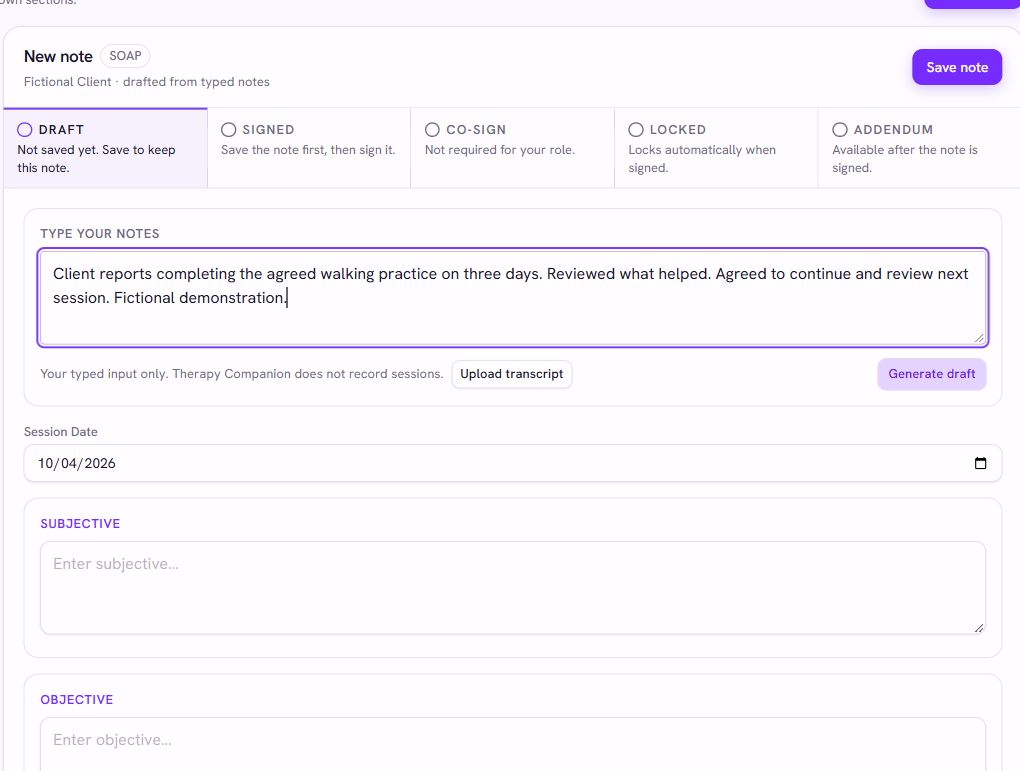
Use the typed-input area to describe what occurred. Separate the client’s report from what you observed, the work you did, and the plan you agreed. Do not add a finding just to fill a section.
Check the resultThe input contains the facts you want documented. No live audio recording is needed for this workflow.
Generate and review the draft
Choose Generate draft. Review the subjective, objective, assessment, and plan sections against your source notes. Correct unsupported statements, missing context, attribution, and wording before relying on the result.
Check the resultEvery retained statement is supported by your knowledge of the session. A fluent draft is not proof of accuracy.
Save, then sign deliberately
Save the reviewed note. Signing is a separate action that finalizes the record; generating a draft does not sign it for you. Check the visible note status and any co-signature requirement for your role.
Check the resultThe record shows the intended saved or signed state. An attempted action or success-looking draft is not a substitute for checking the saved result.
Handle later corrections as part of the record
Signed notes are protected from ordinary editing. Use the supported addendum workflow when a signed note needs additional information. Imported historical notes have their own provenance and are not automatically treated as unfinished notes to sign.
Check the resultThe original record remains identifiable and the correction is attached to the right note.
Questions and limits
Does this require recording or listening to the session?
No. This workflow starts with written material supplied by the clinician. Built-in telehealth and drafting from written notes are separate functions.
Does the AI decide the diagnosis or sign the note?
No. The draft requires clinician review. Clinical decisions, required documentation, and the decision to sign remain with the responsible professional.
Is this a standalone note-generator subscription?
AI-assisted documentation is included in Therapy Companion’s individual practice-platform subscription at $199/month or $1,999/year. If you only need a note generator alongside an EHR you already like, compare that narrower option before replacing your system.
What to try in a demo
Use fictional records to test the workflow from start to finish. Ask to see the saved result, not just the feature’s introduction.
- Type a fictional summary and inspect every generated section.
- Edit and save a draft, reopen it, and confirm the changes.
- Demonstrate signing, co-signature where applicable, and an addendum using fictional records.
Pricing and next steps
The individual subscription is $199/month or $1,999/year. Group and enterprise arrangements are scoped separately. Overturn appeal services are optional and priced separately. Review the full scope, payment-processing terms, and any practice-specific requirements before choosing a plan.